Posts

Showing posts with the label tftp

Poking TL-WR1043ND v1 back to life
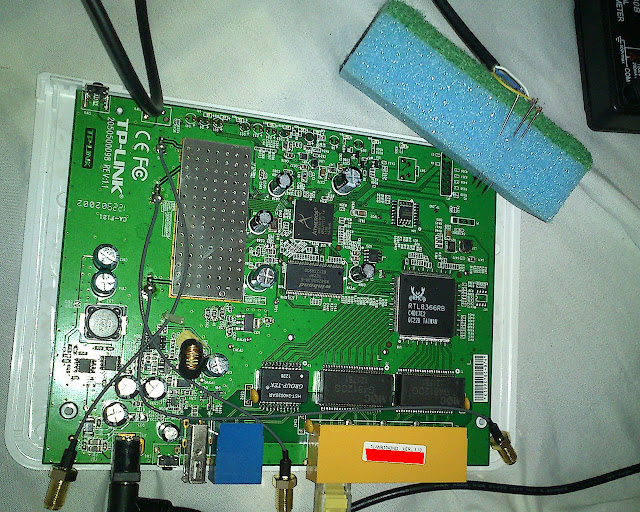
Image
TL-WR1043ND v1.10 unbricking with serial needles Achievement unlocked. I've purchased a used TP-Link TL-WR1043ND v1.10 for about 6 EUR recently. Although, the price was suspiciously low, I was hoping that the seller might not had enough experience with hardware. He had neither included a model number, nor any usable photos in his ad. You could not see any antenna or connector either, and the thumbnails looked indifferent from the ubiquitous 54Mb/s devices also on sale. Fortunately, I could zoom in just enough on one of them to decode the very long phrase "Ultimate Wireless N Gigabit Router" from the handful of pixels visible and so I closed the deal quickly. You generally do not want to ask questions in such cases. Unfortunately, the device did not show any signs of life other than the power LED and the hardware switched LAN. Neither buttons did anything and I could not see any activity over the ethernet ports either, so it was clear that I had to commence debri...

841N serial unbricking with... needles?!

Image
There, I fixed it for you: WARNING: this is a pro-only approach, as potentially bad contacts could introduce typing errors which could spoil your write address and brick the boot loader beyond recovery without you even noticing! So after I got the ill router, I bought a new 3.3V CA-42 cable for about $3 at a local store. I didn't have my soldering kit nearby and anyway didn't want to mess up this beauty, so I first started experimenting. What could I lose besides a non-functional router? I have dozens of fully functional ones to spare. Actually, after all this messing around with firmwares, this is the only one of my routers which is bricked, and it wasn't even my fault. Anyway, I first tested the vendor specific wiring of the cable. Blue is ground, white is RX and yellow is TX on mine. I've then proceeded with readout-only tests. Actually, touching the bare wires themselves almost worked. I could get an almost complete log this way. Although, to get the whole t...

Hidden TFTP of TP-Link routers

I did some more investigation after the positive results with the TL-WR740Nv4  (click the link to get introduced to the way of recovery). Most users report that devices and firmware updates released after a point in time usually have this mode enabled. If a firmware update is available from the vendor for your device, it's a good idea to apply that update before installing OpenWRT or dd-wrt UNLESS you own something for which upgrading will ensure incompatible with OpenWrt, like a TL-WR730N , and possible some other models (please report). Note that some old models have newer updates in different languages, those may also be worth a try ( TODO : compatibility?). Also remember that later on, tftp recovery will need a type of firmware image without a boot loader, so strip it with dd if yours has it ( grep U-Boot , or check the filename). Positive reported claims so far (personal results highlighted): TL-WDR4300 router 192.168.0.86 server 192.168.0.66 query wdr4300v1_tp_...

Tftp secret of TL-WR740N uncovered

I've found out that even this particular entry level router supports anti-bricking, so there's no need for soldering, unless of course you are modding. The method I used is the following: Set up a tftp server  on your PC and verify if it works correctly (configuration, permissions, firewalls, etc.) Rename your target firmware to wr740v4_tp_recovery.bin and copy it to your base folder (by default /tftpboot). I tested with openwrt-ar71xx-generic-tl-wr740n-v4-squashfs-factory.bin r43602. Set up the following static IP for your PC: 192.168.0.66 /255.255.255.0. If you're not sure about the firmware name on a different model, start a packet sniffer on your PC ( tcpdump -i eth0 -n -l ) and look for the name in the RRQ message. Preferably disconnect WAN from the router Connect the PC to a LAN port Power off the router Press and hold the reset button Power on the router After the leftmost (power) LED and the rightmost (padlock) LED turn on alone in a few seconds, release...